


Off-Grid AI Core — Offline Survival Intelligence System
- Regular price
-
$229.95 - Regular price
-
$309.85 - Sale price
-
$229.95
Compare devices
Expedition
For exposure
- Capacity
- 256GB
- Startup
- Opens while the AI loads. Emergency guides answer at once. Slowest to load of the three
- Connector
- USB 3.0 Type-A, adapter included
- Build
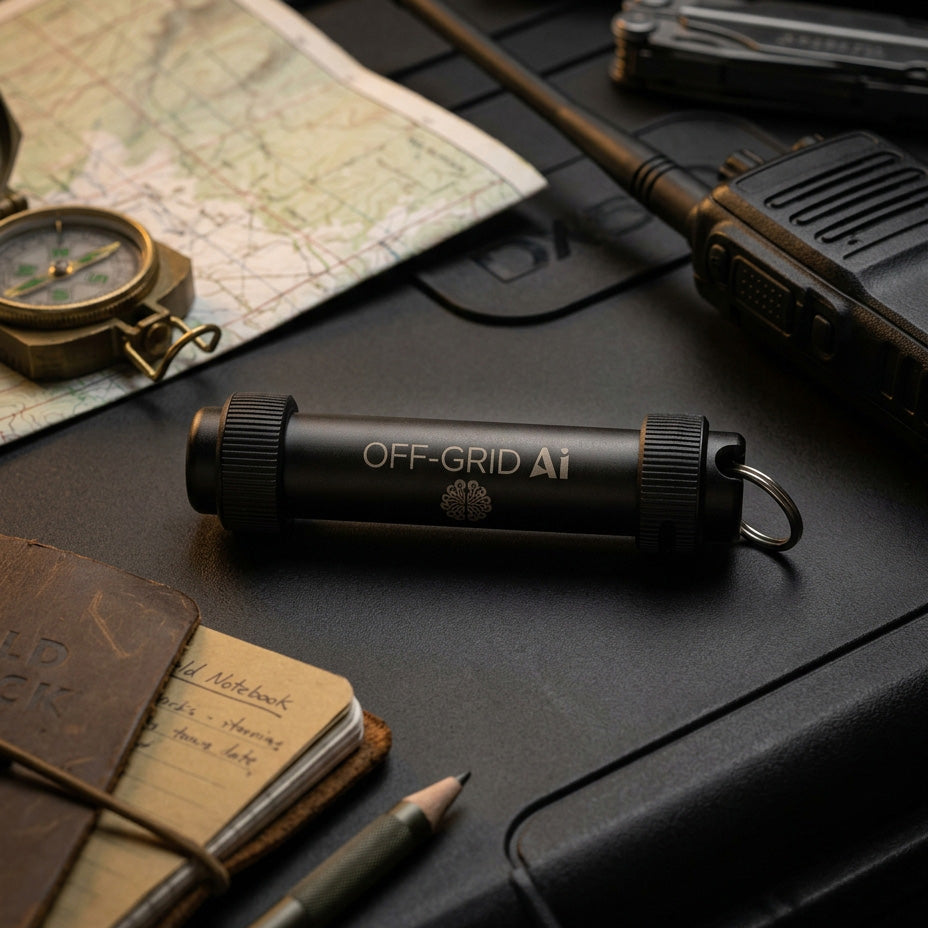
- Anodised aluminium, waterproof to 200m, shock and vibration resistant
- Hardware
- Corsair Flash Survivor Stealth
Marine, overland and remote work, where the device is exposed to the same conditions you are.
Carry
For everyday readiness
- Capacity
- 128GB or 256GB
- Startup
- Opens while the AI loads. Emergency guides answer at once
- Connector
- USB 3.2 Gen 1 Type-A, adapter included
- Build
- Compact anodised aluminium, lightweight and pocketable
- Hardware
- Kingston DataTraveler SE9 G3
A go-bag, a drawer or a glovebox. The most affordable way to keep the full library on hand.
Basecamp
For speed and capacity
- Capacity
- 512GB or 1TB
- Startup
- Opens while the AI loads. Emergency guides answer at once. Fastest to load of the three
- Connector
- 512GB: Type-A and Type-C. 1TB: Type-C, cable and adapter included
- Build
- Solid-state drive in a durable metal casing
- Hardware
- Kingston SSD (SPSD / XS1000)
The primary household or basecamp copy, with room for the entire expansion catalogue.
Your Own
For the drive you already own
- Capacity
- 256GB or larger
- Startup
- Opens while the AI loads. Your drive must read at 150 MB/s or faster, which we test
- Connector
- Your drive’s own: Type-A or Type-C, USB 3.0 or newer
- Build
- Yours, as you send it
- Hardware
- Any brand that passes our capacity, serial and speed checks
Mail us a fast USB drive or portable SSD you already own. We load Core onto it and send it back.
Every device holds the same offline library and answers the same questions. The trade-off worth knowing: Expedition is the toughest in the line and also the slowest, because sealing it against water and shock rules out the faster internals. The hardware is Corsair and Kingston, named so you can look it up. The 128GB Carry holds all 18 subjects and walking maps for the whole US; driving directions and topographic maps need 256GB or larger. Your Own Drive: you mail us your drive and we mail it back loaded. It is erased, and it must pass our capacity, serial and speed checks. Drive requirements. Full comparison below.
Couldn't load pickup availability
- Ships from the USA within 3 business days
- 30-day returns
- Veteran-owned and family-run
- Free updates for life
- Secure checkout




How it works
Plug it in. Ask. Read the source.
From a drive in your hand to an answer on your screen in about a minute. No setup wizard, no account to create, no network to find.
-
01
Plug in the drive
Any Mac or Windows computer with a free USB port. Nothing installs itself into your system and nothing phones home.
-
02
Open the app
It starts on your own machine and loads the library. Around a minute, the first time.
-
03
Ask, in plain words
No prompt engineering, no special syntax. Ask it the way you would ask a person who knows.
-
04
Check where it came from
Every answer names the manual and the section it came from. Open it and read the page yourself.
What you need
- A Mac or Windows computer
- 16 GB of memory recommended
- A graphics card makes it faster, but is not required
- Runs on battery or solar — see power options
- No internet, no account, no subscription
The drive carries the library. Your computer does the thinking — so how fast an answer arrives depends on your machine, not on the drive.
Library
The library that knows your equipment.
Two shelves in one tab. Everything we put on the drive — and everything you add to it. Both fully searchable, both entirely offline.
Eighteen subjects, already on it
Included on every drive. Nothing to add, nothing extra to buy.
- Water “Is this creek water safe once I have boiled it?”
- Food Production “When do I plant if the last frost comes late?”
- Shelter “How do I keep a cabin warm with no power?”
- Navigation “How do I find north without a compass?”
- Communications “Which radio actually reaches the next valley?”
- Medical “How do I close a deep cut in the field?”
- Energy “How big a battery bank do I actually need?”
- Firecraft “How do I start a fire in soaking rain?”
- Sanitation “Where does a latrine go so it will not foul the well?”
- Mobility “How do I get a truck out of deep mud on my own?”
- Security “How do I make the house harder to walk into?”
- Tools “How do I sharpen a chainsaw chain by hand?”
- Logistics “How much food do four people need for a month?”
- Wild Food “What can I actually eat on this land in winter?”
- Infrastructure “The well pump is dead — where do I start?”
- Group Resilience “How do we split the work when this lasts weeks?”
- Decision Support “Do we stay, or do we go?”
- Mindset “How do I keep it together on day nine?”

My Documents
Bring your own manuals.
Add your own PDFs and they become searchable right alongside everything we shipped. This is the feature that makes it yours.
The manual for your truck. Your well pump. Your generator, your solar inverter, your tractor. Medication leaflets. The property survey. Livestock records. The documentation nobody would ever put in a general library, because it is specific to you — indexed and searchable with no internet, for as long as you own the drive.
- 200+ Documents
- 2 GB+ Total storage
- 100 MB Per file
- 50,000+ Searchable passages †
Baseline for an 8 GB machine. OGAI measures your hardware at startup and raises the ceiling when it finds the memory — more RAM, more documents. That’s tens of thousands of pages before you reach the floor.
† Documents, storage and file size are checked the moment you add a file, so you are told straight away. Passages are counted while indexing runs — a text-dense PDF can reach that limit after the upload already looked successful. An upload is also refused if it would leave less than 1 GB free on the drive.
Nothing is uploaded
Your file is read, split and indexed on your own machine — because there is nowhere to upload it to. No server, no account, no exceptions.
It never gets in your way
Indexing runs deliberately slowly, one piece at a time, so building an index never slows down a question you are asking at that same moment.
No half-built results
A new document becomes searchable the instant its index is complete, and not a moment before. You will never search a partly-finished one.
Power cut? It resumes
If the machine dies mid-index, the job picks up where it left off next time you start — rather than quietly leaving you with half a manual.
Maps
Navigate when the network disappears.
Every mapping app you own stops at the edge of coverage. This one does not have an edge, because there was never a connection to lose.
The map decides where. The library decides what to do about it.
Geographic answers come from the map data on the drive, not from a model guessing at coordinates. Intel reads that result and explains it from the same cited library it uses for everything else.
Streets, terrain and topo
Street maps, terrain, topographic contours and mapped infrastructure — rendered from data on the drive, not fetched from a tile server.
Waypoints and coordinates
Drop a waypoint, read its coordinates, and find it again. Search for places and geographic features by name with nothing connected.
Routes and distances
Work out a route between two points, measure the distance between them, and take a bearing.
Elevation and trails
Read elevation at a point, follow contour lines, and locate mapped trails across the US.
“Find the nearest mapped water source and tell me how to make it safe to drink.”
Maps answers where
The nearest mapped surface water, its coordinates, how far away it is and on what bearing — read off the map data on the drive.
Intel answers what to do
How to treat water from that kind of source, cited to the manual it came from, so you can open the page and read it yourself.
Neither half is the model improvising. The location is a fact from the map; the treatment is a passage from the library.
Map coverage
Every drive ships with the full map set as part of Core: a world map, plus street-level detail, contours, terrain, trails and routing across the United States. Nothing extra to buy or install.
Where it stops: street-level detail, contours, terrain and trails currently cover the US only; elsewhere you have the world map. Geographic facts come from the map data rather than the model, so where the data does not reach, Maps says so instead of estimating — the same rule Intel follows when the library has no answer.
Honest by design
It tells you when not to trust it.
Every other AI is graded on how fluent it sounds. This one is graded on whether you can check it — and on whether it admits the moment it is out of its depth.
It answers from real documents
Ask a question and it goes and finds the passage that answers it. It is not recalling something it read once during training — it is reading a document, now, in front of you.
It would rather say nothing
When the library does not cover your question, it says so instead of producing a confident paragraph anyway. Refusing well was harder to build than answering, and it is the part we are proudest of.
It never goes online
Not a privacy policy promising your data is safe. There is no connection, so there is no route for your questions to leave your machine in the first place.
Ask twice, get the same answer
It is not rolling dice for variety. That matters at three in the morning when you are re-checking something you were told an hour ago and need it to still say the same thing.
Every claim has an address
Not "according to reliable sources". The manual, the section, the page — open it and read it yourself, and disagree with it if you think it is wrong.
It runs on the computer you own
It loads one model at a time, deliberately, so the whole thing runs on an ordinary laptop instead of demanding a workstation you would have to go and buy.
Companion
And when it is not cited, it says so.
Companion is the open-ended tab — for planning a build, drafting a checklist, or thinking through a scenario before you are standing in one. It is a conversation, not a citation, and the product is blunt about the difference. This banner sits in the tab itself:
Companion answers come from a general AI model with no source verification and may be wrong. Not preparedness guidance — use Intel for survival or medical answers.
We shipped a product that tells you when not to trust it and sends you to the verified tab for anything that matters. That is the clearest signal we can give you that the cited answers elsewhere are cited for a reason.
Intelligence. Offline.
Off-Grid AI™ Core is the foundational platform of the Off-Grid AI ecosystem. It is a fully offline intelligence system stored on a USB drive and engineered to provide verified, citation-backed knowledge when the internet, power grid, or infrastructure fails.
The Core system contains the base survival knowledge library and the local AI runtime required to operate the system. Expansion packs can be added to extend the system’s capabilities into specialized domains such as field medicine, electrical systems, automotive repair, and tactical operations.
Off-Grid AI runs entirely on your computer with no internet connection required. It retrieves information from a curated library of field manuals, engineering references, and medical texts so you can access critical knowledge anytime, anywhere.
The Off-Grid AI Core System
The Core system contains the foundational knowledge required for survival and self-reliance during infrastructure failures and austere conditions.
- Water Identifying safe water sources, purification methods (boiling, filtration, chemical), storage, and contamination risks
- Food Production Basic gardening, soil awareness, and simple crop cycles
- Shelter Building temporary and semi-permanent shelters, insulation, weatherproofing, and heat retention
- Navigation Map and compass use, basic navigation, and weather pattern recognition
- Communications Basic radio theory, signaling methods, and non-digital communication
- Medical First aid, wound cleaning, infection prevention, and stabilization fundamentals
- Energy Sizing a battery bank, running solar and generators, and rationing power that has to last
- Firecraft Fire starting methods, fuel selection, efficiency, and safety
- Sanitation Waste disposal, latrine setup, hygiene systems, and contamination control
- Mobility Keeping vehicles moving over bad ground, recovering a stuck load, and choosing a route
- Security Situational awareness, hardening a property, and reducing exposure without escalating
- Tools Fixing essential tools, material substitution, and field-expedient solutions
- Logistics Working out what a household consumes, what to hold, and how long a stock will last
- Wild Food Foraging and hunting principles, food storage, dehydration, and spoilage prevention
- Infrastructure Wells, pumps, septic, and the household systems that fail when the utility behind them does
- Group Resilience Dividing work, keeping people fed and rested, and holding a group together over weeks
- Decision Support Weighing the call under pressure — stay or go, treat or move, spend now or hold
- Mindset Managing stress, fatigue, and morale when the situation runs long
The system uses a retrieval-first architecture that ensures answers are synthesized only from verified knowledge sources rather than speculative AI generation.
Key System Features
- 100% offline operation
- No internet connection required
- No accounts or subscriptions
- No telemetry or external servers
- Citation-backed responses from verified sources
- Expandable with modular knowledge packs
- Runs locally on your computer
- Portable and field-ready
Hardware Form Factor Options
Every Off-Grid AI device holds the same offline knowledge library and answers the same questions with no signal, no power grid and no account. What changes is how much it carries, how quickly it loads, and how much abuse it survives. Choose by where the device will live.
- Aircraft-grade anodized aluminum housing
- Waterproof to 200 meters
- Shock-resistant and vibration-resistant
- Industrial USB-A connector; includes USB-to-USB-C adapter cable
- 256GB
Built for marine, overland and remote work, where the device is exposed to the same conditions you are. It is the toughest device in the line and, because it uses an earlier USB generation, also the slowest to load.
- Compact anodized aluminum casing
- Lightweight, pocketable, plug-and-play
- USB-A connector
- 128GB or 256GB. The 128GB carries all 18 subjects and walking maps for the whole US; driving directions and topographic maps need 256GB or larger.
The most affordable way to keep the full library on hand. Suited to a go-bag, a drawer or a glovebox — sheltered storage and everyday handling.
- Solid-state drive in a durable metal casing
- Native USB-A and USB-C, cable-free design
- Fastest to load of the three
- 512GB or 1TB
The primary household or basecamp copy. Holds the entire expansion catalogue with room to spare and loads fastest.
Compare the three
| Expedition | Carry | Basecamp | |
|---|---|---|---|
| Best for | Exposure — marine, overland, remote work | Everyday readiness on a budget | The primary household copy |
| Storage | 256GB | 128GB or 256GB | 512GB or 1TB |
|
Startup what happens when you launch |
Opens while the AI loads; emergency guides answer at once. Slowest to load | Opens while the AI loads; emergency guides answer at once | Opens while the AI loads; emergency guides answer at once. Fastest to load |
| Media | Flash | Flash | Solid-state drive |
| Interface | USB 3.0 Type-A | USB 3.2 Gen 1 Type-A | USB 3.2 Gen 2, Type-A and Type-C |
| Protection | Waterproof to 200m, aircraft-grade aluminum, shock and vibration resistant | Premium metal casing | Durable metal casing |
| Connects to | USB-A devices (USB-C adapter included) | USB-A devices | USB-A and USB-C — laptops, tablets, phones |
The trade-off worth knowing: Expedition is the toughest device in the line and also the slowest, because it uses an earlier USB 3.0 interface. If the device will face water, grit or impact, that trade is worth making — a fast drive that has failed answers nothing. If it will live somewhere sheltered and you want the shortest wait, choose Basecamp. Carry sits between the two on both counts.
Expansion Packs
Off-Grid AI Core can be expanded with specialized knowledge modules called Expansion Packs. These packs add new technical domains to the system without requiring new hardware.

Trauma stabilisation, cardiac and respiratory emergencies, infection management and drug references — well past where a first-aid course stops.

Diagnosing illness, dressing wounds, controlling parasites and assisting difficult births, for livestock and working animals.

Fault-finding, solar arrays, sizing a battery bank, inverters and safe off-grid wiring, with the code references alongside.

Engine repair, fuel systems, transmissions and small-engine maintenance — petrol and diesel, vehicles and equipment.

Situational awareness, defensive planning, movement, and coordinating a small group when everyone is tired.

Soil management, crop rotation, seed saving and pest control, aimed at real yields rather than a hobby plot.
Expansion packs extend the knowledge library and AI retrieval system to provide deeper technical guidance for specialized disciplines.
Bundle Options
Off-Grid AI Core is available as standalone hardware or as bundled systems that include expansion packs preloaded on the device.
Core system plus Master Electrician Pack and Master Mechanic Pack
Bundles provide expanded knowledge coverage immediately upon first launch without requiring additional downloads.
How It Works
- Insert the Off-Grid AI drive into your computer
- Launch the local Off-Grid AI application
- Ask questions through the built-in interface
- The system retrieves verified knowledge from its local library
- Answers are synthesized and presented with citations
The app opens while the AI model loads. Emergency guides — severe bleeding, cardiac arrest, stroke and more — answer straight away; full answers follow once the model is ready. The fast 8B model loads by default, and you can move up to a larger model on a machine with the memory for it.
If information is not present in the library, the system will state that clearly rather than guessing.
Privacy & Security
- No cloud connectivity
- No data collection
- No telemetry
- No external APIs
- All queries remain on your computer
Who This Is For
- Preparedness and survival enthusiasts
- Homesteaders and off-grid communities
- Emergency responders
- Remote workers and explorers
- Engineers and technical professionals
- Anyone who wants critical knowledge available offline
